How to Create PDF Reports from Typeform Responses (Automatically)
Turn Typeform self-assessment responses into personalized PDF reports automatically, with no manual work, complex integrations or platform switching.
You've created a self-assessment quiz in Typeform. Now you need to turn each response into a professional PDF report for your clients.
The problem? Typeform doesn't have a built-in PDF report generator. You're stuck with:
- Manually copying data into Google Docs or Canva
- Building complex Zapier workflows
- Hiring developers to create custom solutions
There's a simpler way. In this guide, I'll show you how to automatically generate branded PDF reports from Typeform self-assessment responses—without switching platforms, writing code, or complex integrations.
Keep using Typeform. Just add Diro for reports.
The Problem with Manual Typeform Reports
Let's say you're a leadership coach. You offer a free "Leadership Style Assessment" on your website. People fill out your Typeform quiz, and you want to send them a personalized PDF report with their results.
For each respondent, you need to:
- Export the response from Typeform
- Calculate their scores for each category
- Create charts (radar charts, bar graphs)
- Write personalized feedback based on their scores
- Design the report in Canva or Google Docs
- Export as PDF and send to them
If you get 50 quiz responses per month, that's a significant amount of manual work. Time you could spend coaching.
The Solution: Automated PDF Reports with Diro
Diro's Typeform to PDF integration connects to your Typeform responses and automatically generates personalized PDF reports for each respondent. The same workflow powers Typeform assessment reports too.
Here's how it works:
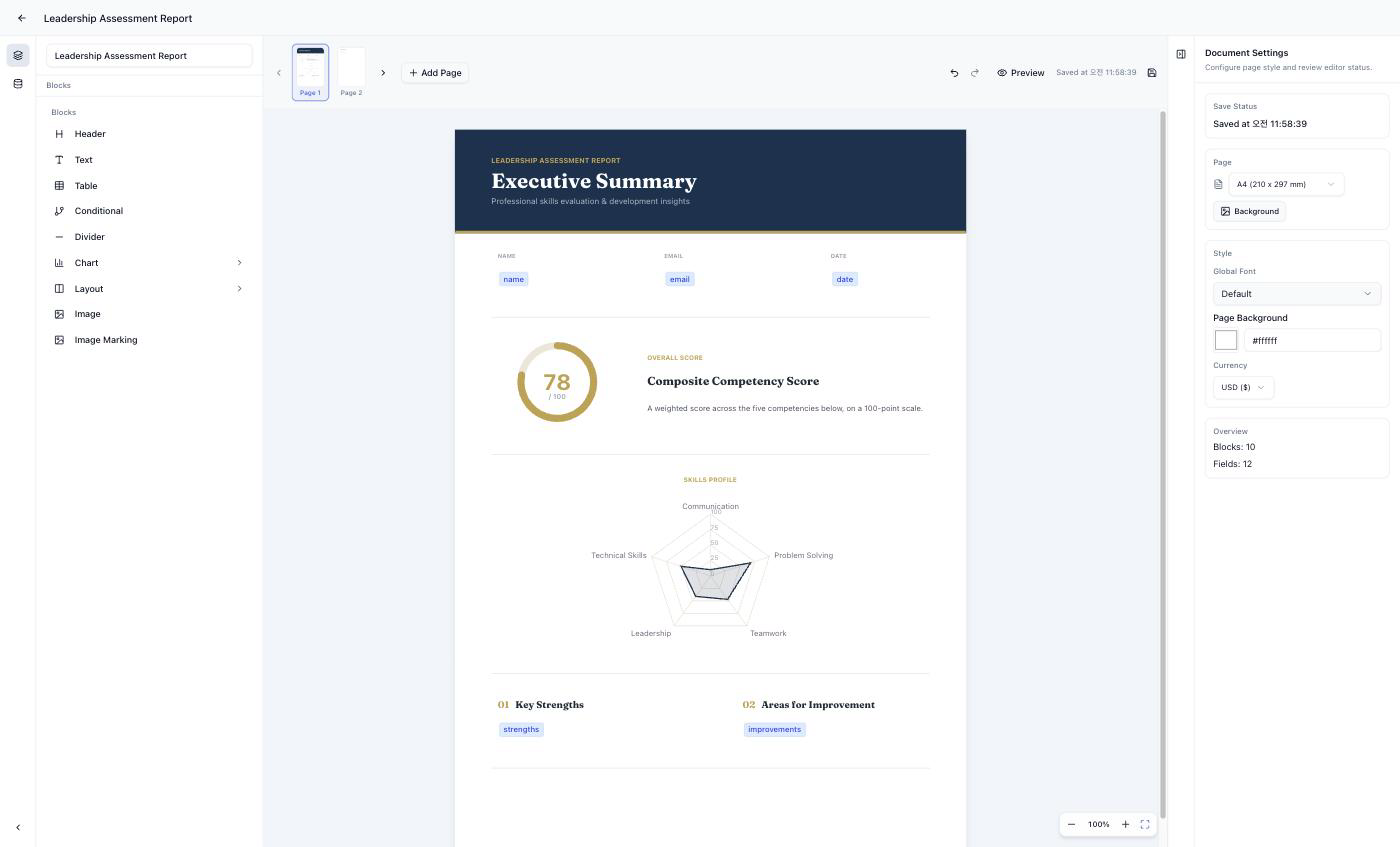
Step 1: Design Your Report Template
Create your report layout once in Diro's visual editor:
- Add your logo and brand colors
- Insert dynamic fields (name, scores, dates)
- Create charts that auto-populate with assessment data
- Add conditional text blocks (e.g., "You scored high in Strategic Thinking" vs "Consider developing your Strategic Thinking skills")
Step 2: Connect Your Data
Upload a CSV export from Typeform, or connect the form directly with a Personal Access Token.
Each respondent = one personalized report.
Step 3: Generate Reports
Click "Generate" and Diro creates individual PDF reports for every respondent.
- 100 quiz responses? 100 personalized PDFs in seconds.
- Each report has the correct name, scores, charts, and recommendations.
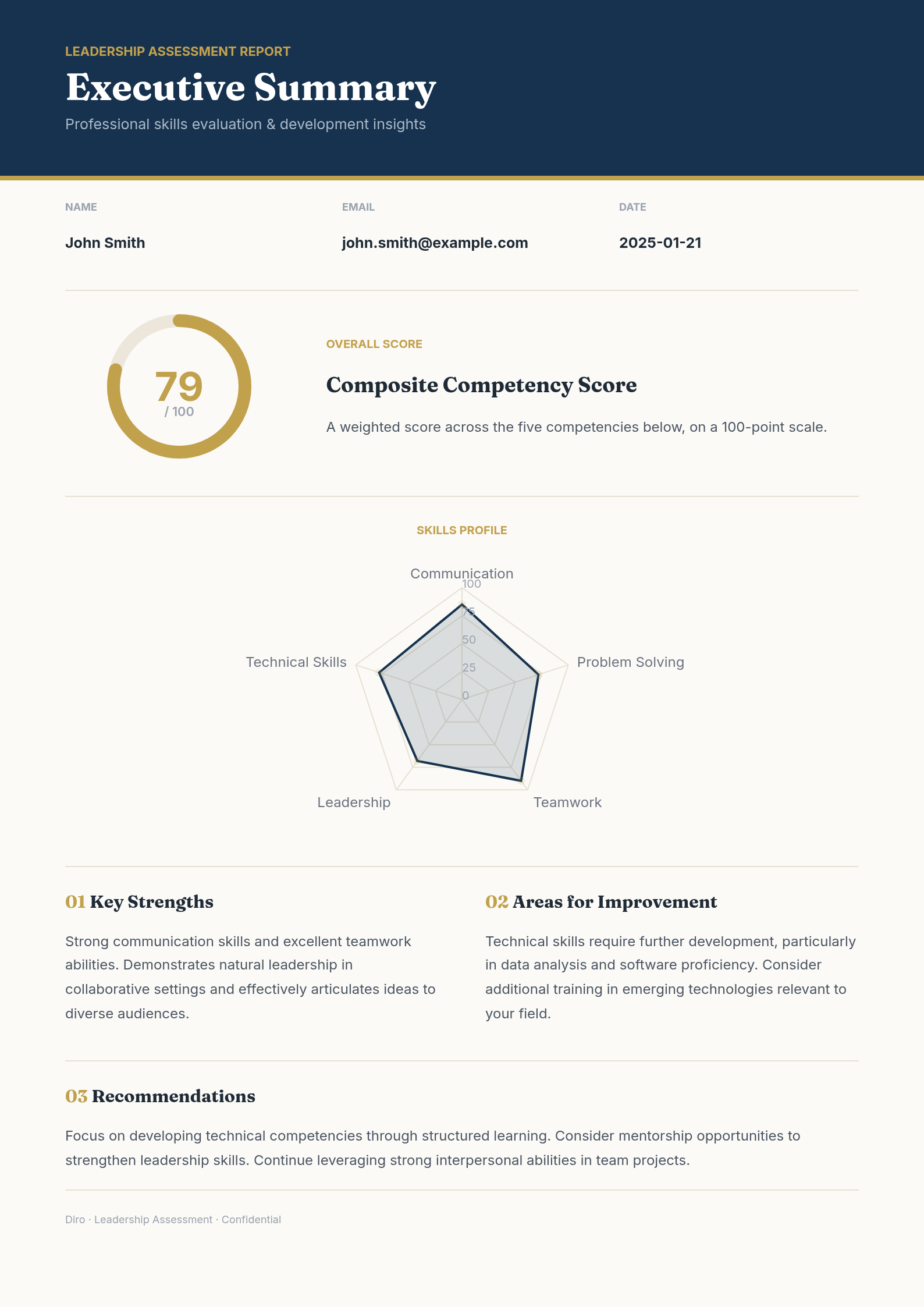
Example: Leadership Self-Assessment Report
Here's what an automated self-assessment report looks like:
Page 1: Overview
- Respondent name and date
- Overall leadership style result
- Radar chart showing 6 competency areas
Page 2: Your Results
- Score breakdown by category
- Bar chart visualizing strengths and development areas
- Your leadership style type (e.g., "Visionary Leader")
Page 3: Personalized Recommendations
- Conditional text based on your specific scores
- Development suggestions for lower-scoring areas
- Next steps and resources
All of this is generated automatically from their Typeform responses.
The "Free Assessment → Paid Service" Funnel
This is why self-assessment reports are so powerful for coaches and consultants:
- Attract: Offer a free assessment quiz on your website
- Deliver: Automatically send a professional PDF report
- Convert: Include a CTA for your paid coaching/consulting services
Your prospects get instant value. You get qualified leads who already understand their gaps.
No manual work. No delays. Reports sent automatically.
Who Uses This?
- Leadership coaches offering free leadership style assessments
- Career coaches providing personality/strengths assessments
- Business consultants delivering business health check reports
- Fitness coaches generating personalized workout/nutrition plans
- Financial advisors creating financial wellness reports
Anyone who uses quizzes to attract and qualify clients.
Why Not Use Zapier + Google Docs?
You can technically build this with Zapier, Google Docs, and a PDF converter. But:
| Aspect | Zapier + Google Docs | Diro |
|---|---|---|
| Setup complexity | Hours of configuration | Visual drag-and-drop |
| Charts | Not supported | Built-in radar, bar, line charts |
| Conditional logic | Complex workarounds | Visual if/then rules |
| Design quality | Basic docs | Professional templates |
| Maintenance | Breaks often | Managed for you |
Diro is purpose-built for assessment-to-report automation.
Pricing
| Plan | Price | What You Get |
|---|---|---|
| Free | $0 | Try it out, 50 reports/month, unlimited templates |
| Pro | $29/month | 500 reports/month, unlimited templates, API access |
No per-report fees. No hidden costs. Cancel anytime.
Getting Started
- Sign up for free at getdiro.com
- Choose a template (Leadership Assessment, Skills Assessment, etc.) or start blank
- Upload sample data to test your report
- Customize your design and conditional logic
- Connect Typeform with a Personal Access Token
- Generate reports and convert leads to clients
Conclusion
Stop spending hours manually creating PDF reports from Typeform quiz responses.
With Diro, you design once and deliver unlimited personalized assessment reports automatically. Better experience for your prospects, more time for your actual work.
FAQ
Can I use Google Forms instead of Typeform? Yes. Typeform, Tally, and Google Forms connect directly, while JotForm and other tools work through a CSV export (or a custom webhook).
How much does it cost? Free tier available with 50 reports/month. Pro plan is $29/month for 500 reports and unlimited templates.
Do I need to know how to code? No. Everything is visual drag-and-drop.
Can I white-label the reports? Yes. Add your logo, colors, and branding. No Diro branding on your reports.
Can reports be sent automatically when someone submits the form? Yes. Connect Typeform → Diro webhook for automatic report generation. Diro doesn't email the report to respondents yet, so sending it is a separate step.
Try Diro for free
Design once, generate forever. Turn your data into professional PDF documents in minutes.