Automated Certificate Generator: Create Bulk Certificates in Seconds
Generate personalized PDF certificates from a spreadsheet automatically. No design skills, no code: upload your data and create thousands at once.
You just finished a workshop with 200 attendees. Now you need to send each person a personalized certificate of completion.
The options aren't great:
- Edit each certificate manually in Canva (5+ minutes each = 16+ hours)
- Use mail merge with clunky formatting issues
- Pay for expensive enterprise tools ($100+/month)
There's a better way. In this guide, I'll show you how to automatically generate professional certificates from a simple spreadsheet using Diro's CSV to certificate integration—no design skills, no code, no expensive software. (Using Google Forms instead? See Google Forms to certificate.)
Design once. Generate thousands.
The Problem with Manual Certificate Creation
Let's say you run an online course. Every month, 50-100 students complete it. For each student, you need to:
- Open your certificate template in Canva
- Replace the name manually
- Update the date
- Add the course name and instructor signature
- Export as PDF
- Rename the file with the student's name
- Send via email
Time per certificate: 5-10 minutes
With 100 graduates per month, that's 8-16 hours of repetitive work. Every single month.
And if you make a typo? Start over.
The Solution: Bulk Certificate Generator with Diro
Diro takes your attendee list and automatically generates individual PDF certificates for everyone.
Here's the workflow:
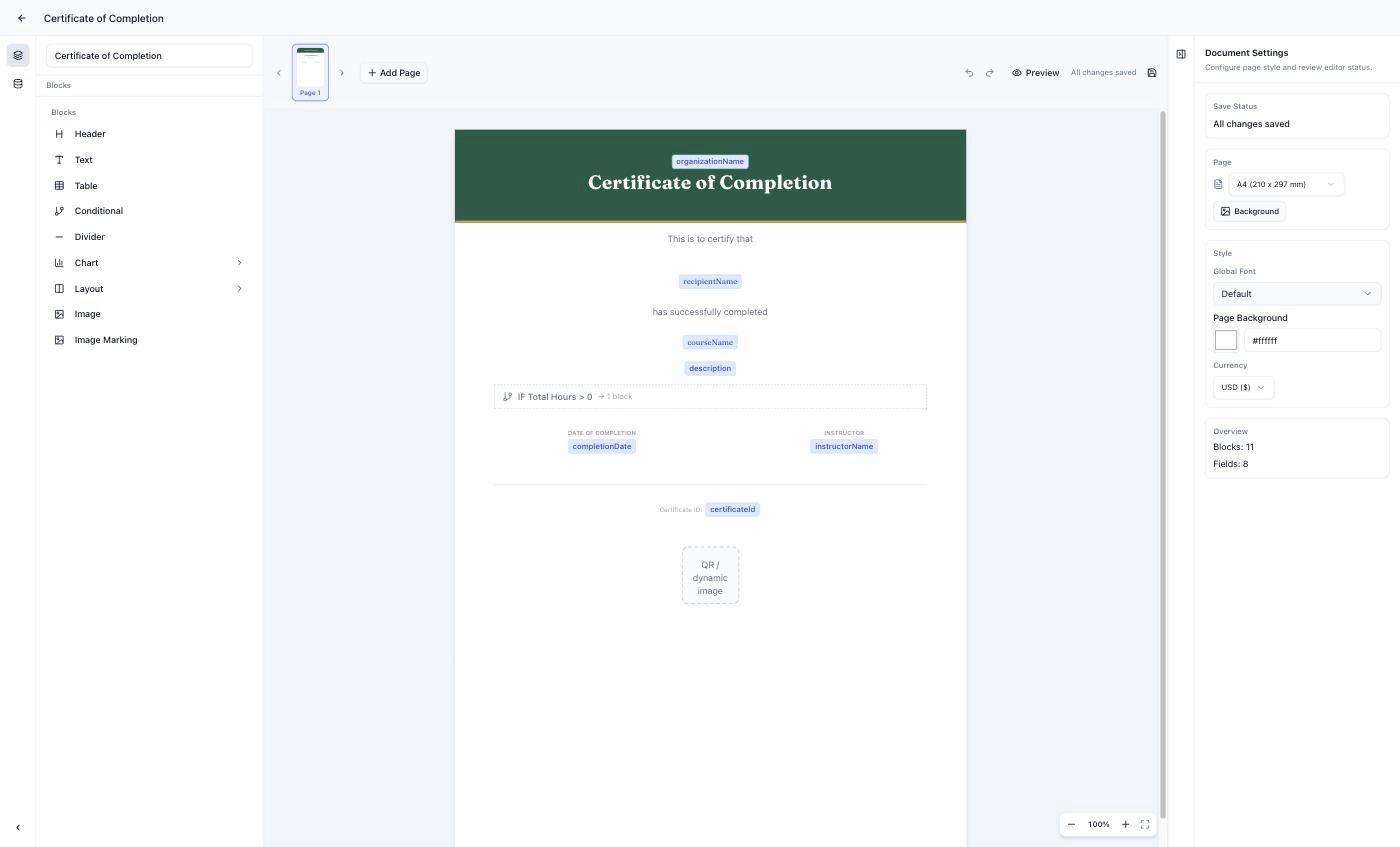
Step 1: Design Your Certificate Template
Create your certificate design once in Diro's visual editor:
- Upload your organization's logo
- Set brand colors and fonts
- Add dynamic fields:
{{name}},{{date}},{{course_name}} - Include a signature image or QR verification code
Step 2: Upload Your Attendee List
Export your student/attendee data as a CSV file. Columns might include:
| name | course_name | completion_date | |
|---|---|---|---|
| John Smith | john@email.com | Python Basics | 2026-01-15 |
| Sarah Lee | sarah@email.com | Python Basics | 2026-01-18 |
Upload this CSV to Diro.
Step 3: Generate All Certificates
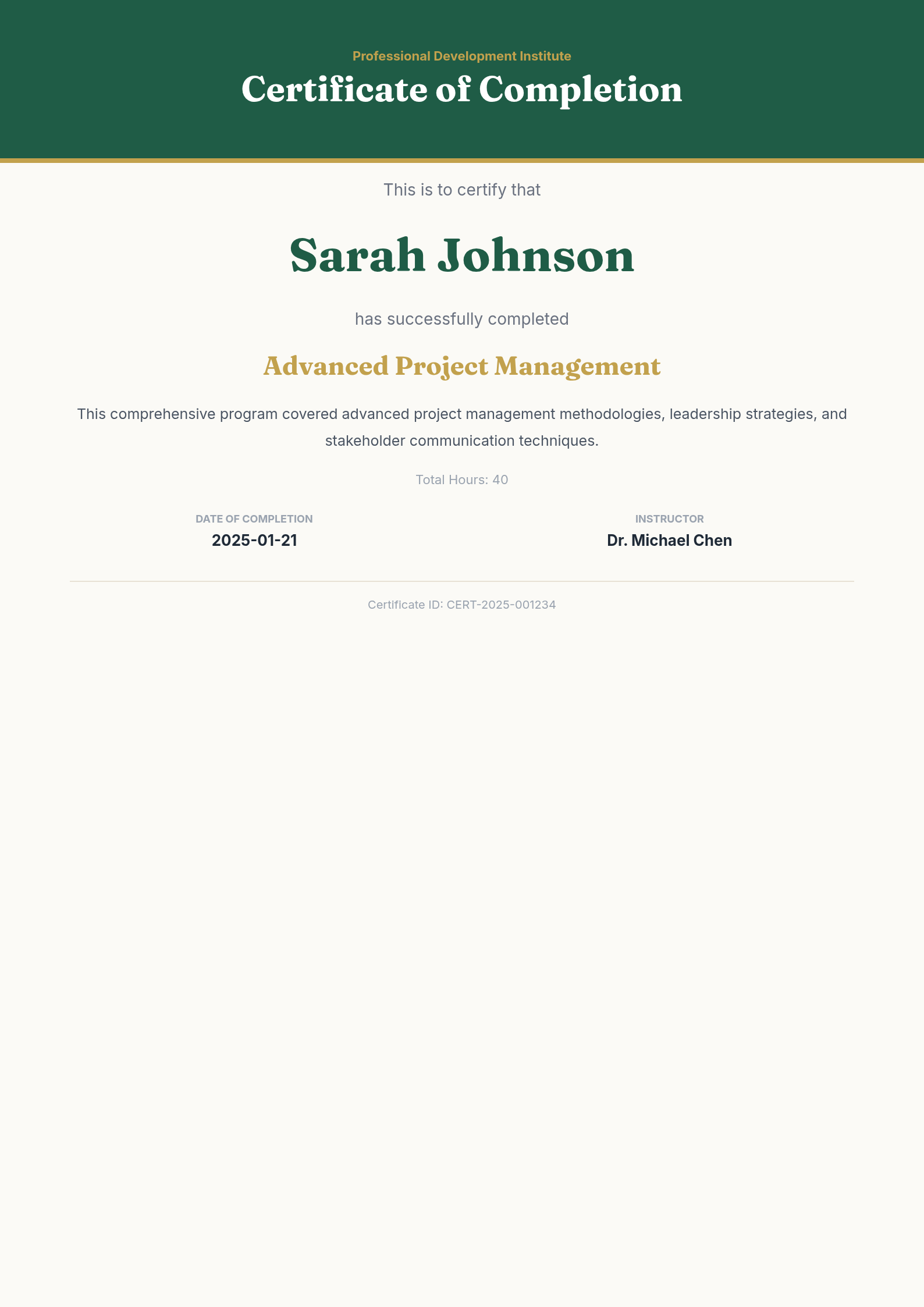
Click "Generate" and Diro creates individual PDF certificates for every row in your spreadsheet.
- 500 attendees? 500 personalized certificates in seconds.
- Each certificate has the correct name, date, and course details.
- Download as a ZIP file or integrate with your email system.
Use Cases for Automated Certificates
Online Course Completion Certificates
Issue completion certificates automatically when students finish your course.
- Connect with Teachable, Thinkific, or Kajabi via Zapier
- Trigger certificate generation on course completion
- Send via email automatically
Example: A coding bootcamp generates 200+ certificates monthly without any manual work.
Workshop & Webinar Attendance Certificates
Send professional certificates to all attendees after your live session.
- Export attendee list from Zoom, Eventbrite, or Google Forms
- Generate certificates with attendance date and topic
- Bulk download or auto-email
Example: A marketing agency issues certificates for their monthly workshops—exported from Eventbrite, generated in 30 seconds.
Corporate Training Certificates
Create certificates for employee training programs.
- Track which training modules each employee completed
- Use conditional logic: different certificate designs for different programs
- Add manager signatures and HR validation
Example: HR teams automate compliance training certificates for 500+ employees.
Conference & Event Certificates
Issue participation or speaker certificates at scale.
- Different templates for attendees vs speakers
- Include session names and dates
- QR codes for verification
Why Not Use Canva or Google Slides?
You can create certificates in Canva. But scaling is the problem:
| Aspect | Canva / Google Slides | Diro |
|---|---|---|
| Per-certificate editing | Manual, one by one | Automatic from spreadsheet |
| 100 certificates | ~8 hours | ~30 seconds |
| Conditional logic | Not possible | Built-in (different designs per type) |
| Data connection | None | CSV, Zapier, Make |
| QR verification codes | Manual | Auto-generated |
| Charts & visualizations | Limited | Built-in radar, bar, line charts |
Canva is great for designing one certificate. Diro is built for generating thousands.
Advanced: Conditional Logic for Different Certificate Types
Need different certificate styles based on data? Diro handles that with visual if/then rules.
Examples:
- Certification level: "Beginner" gets a blue border, "Advanced" gets gold
- Completion status: Only generate if
status = "completed" - Course type: Different templates for "Leadership Training" vs "Technical Skills"
- Pass/Fail: Only issue certificates for scores above 70%
Set up conditions visually—no coding required.
Pricing
| Plan | Price | What You Get |
|---|---|---|
| Free | $0 | 50 certificates/month, unlimited templates |
| Pro | $29/month | 500 certificates/month, unlimited templates, API access |
No per-certificate fees. Generate 10 or 500—same price.
Getting Started with Your Automated Certificate Generator
- Sign up for free at getdiro.com
- Choose the Certificate template or start from blank
- Customize with your logo, colors, and layout
- Add dynamic fields like
{{name}},{{date}},{{course_name}} - Upload your CSV and generate all certificates
- Download or connect to your email tool via Zapier
5-minute setup. Hours saved every month.
Conclusion
Stop wasting hours manually editing certificates one by one.
With Diro's automated certificate generator, you design your template once and generate unlimited personalized PDFs automatically. Better for you. Better for your students.
FAQ
Can I add QR codes for certificate verification? Yes. Diro can auto-generate unique QR codes linking to a verification page.
What file formats are supported? PDF (primary) and PNG exports available.
Can certificates be sent automatically via email? Yes. Connect Diro to your email tool via Zapier or Make for automated delivery.
Do I need design skills? No. Start with a pre-built template and customize with drag-and-drop.
Can I use my existing Google Forms data? Yes. Export your Google Forms responses as CSV and upload to Diro.
Is there a limit on certificate quantity? Free tier includes 50 certificates/month. Pro plan ($29/month) includes 500 certificates/month with unlimited templates.
Can I white-label the certificates? Yes. Add your logo, colors, and branding. No Diro branding appears on your certificates.
Does it work with Typeform or Tally? Yes. Typeform, Tally, and Google Forms all connect directly, and any survey tool that exports CSV works too.
Try Diro for free
Design once, generate forever. Turn your data into professional PDF documents in minutes.